From the greek word “chronos" which means “time", and the latin “curos", which means “to attend", Chronocross is a Todo app that integrates other productivity techniques: The Pomodoro Technique and Eisenhower Matrix, into one cohesive workflow.
In a nutshell, Chronocross is really just a simple tool that I built to complement my workflow. I'm a huge productivity geek. I was hooked on crossing things off a list. I use Cirillo's Pomodoro Technique to manage procrastination and maintain my focus.
The Pomodoro Technique® is a time management method that uses a timer to break down your work into intervals, traditionally 25 minutes in length separated by short breaks. — Wikipedia
Coupled with another productivity technique, Eisenhower Matrix to help me prioritize which task should be worked on first thing in the morning and which should be last. My every working day felt like total bliss.

Eventually, moving between a todo app, a separate Pomodoro app, and a spreadsheet for my Eisenhower box felt lacking, it felt like it was begging me to integrate them all together into one cohesive app. At this point, I can't really call myself a Software engineer if I didn't immediately answer to the calling.
Originally, Chronocross was built using Angular. I was learning Angular back then, building an app using it seems like a good practice. But I don't want it to be a web app. I don't want to give myself a chance to procrastinate by switching and fooling around on other sites while I keep it running on a separate tab. I decided to use Electron.js and develop it as a desktop application.
Sounds good, except learning Angular together with Electron.js along with other serious things happening at my work back then made it more demanding to accomplish. I was working as a Java developer back then and this was my first time coming back to frontend after the whole Javascript libraries revolution. I mean, I know the basics: HTML, CSS, JQuery and Javascript back at the university, I've built school projects using those before. But oh boy, was I in for a surprise. Configuring Electron.js to work with Angular was a nightmare to my unacquianted mind. Modify tsconfig? and Webpack? Loaders? Install NPM? What? Javascript can access the I/O now? Nodejs?

I did eventually managed to make it work (somehow). It took me a really long time and countless frustrations to do it, almost wanted to just use Java and Swing and not bother learning something new that year. Halfway through my desired features I ended up shelving my little pet project.
Almost a year later, I was already working on a different company as a Full-Stack Engineer, whatever that means (I think it means: I know Java and a little bit of HTML), using Angular in the front-end. I started to get that itch of wanting to learn new stuff again. I found myself on the doorstep of the Vue ecosystem. I knew about Vue even back when I was first learning Angular but since Angular was the company's choice of framework, I just shrugged it off at that moment. IMHO, Vue. Is. Pretty. Freaking. Awesome. The experience was love at first writing of Vue instance.
Quasar Framework
After porting my previous Angular portfolio website to Vue, I ventured farther in the Vue ecosystem's doorsteps and found myself along the valleys of Quasar Framework. I read the docs. And. It. Was. Just. Soooo. good.
Quasar is a framework that lets you build responsive Single-Page Apps, Server-side Rendered apps, Progressive Web Apps, Hybrid Mobile apps and Electron apps, all using the same codebase. Not only that it has a built-in UI library too that comes with Material and IOS theme. This is like a dream. All you ever need to worry about is build your idea, if you do it right, in just a single command you can build your project for other platforms. How awesome is that? I know some people will probably raised an eyebrow for Hybrid cordova apps and Electron apps. But in my opinion, Quasar does the job for 90% of the use cases maybe even more. And it's still improving day by day.
Chronocross 2.0
I took the opportunity of learning Quasar by getting back in building Chronocross. I decided to build it as a mobile app this time. I wanted to at least have a similar experience of leaving your monitor and keyboard to actually wind up an actual pomodoro or a kitchen timer.
I scrapped my previous designs and started out fresh. For this little app, I decided that I will implement four major features represented by separate tabs: The Pomodoro Tab, Tasks tab, Eisenhower Box tab and the Reports tab.
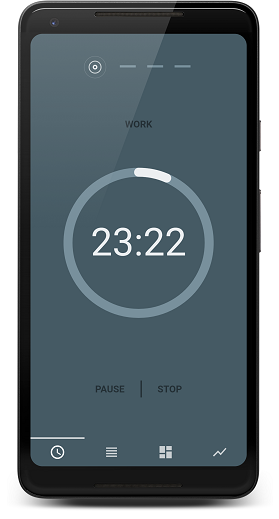
The Pomodoro tab is a pretty regular timer that you can play, pause, stop and restart. Sprint indicators at the top. A 5 minutes break sprint comes after every 25-minute work sprint, the last break sprint, which I call the long break is 15 minutes. Of course, these sprint duration could always be tweaked on the settings but those were the traditional durations so I made them the default.
The second tab contains is the Tasks list. Here you'll find, well, you're tasks. Listed as cards, each card contains some basic info at first glance, task name, priority and a progress bar that represents the time spent work on the task versus it's estimate. There's a collapsible that contains other information such as, the actual estimated time, current progress and a short description. There's also a list of subtasks in case you feel like breaking the main task more into chunks.
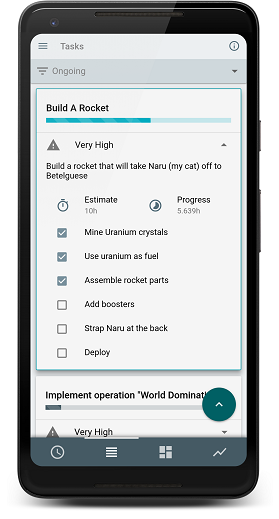
Tapping a task selects it and the previous little FAB turns to an expandable FAB that contains other options. Delete, Edit, Reset (resets the progress back to 0), Mark as done and play. Hitting the play button will run the Pomodoro timer on the selected task, which means all of your work sprint will be recorded on the currently selected task. This will be very useful for some tracking. The Pomodoro app could still be used independently if there are no selected task (or you unselect a current task by tapping it again) it will just function as a regular pomodoro timer. To prevent the records from messing up, I disabled the select functionality if the timer is currently running but it is still possible to collapse and expand the subtask of the other tasks though.
I used Firebase's real-time database to store all the tasks and progress time records, which is also a pretty convenient service. There's a plugin especially made for vue to make it even more convenient which is called Vuefire. Of course, I used Firebase database together with FirebaseAuth.
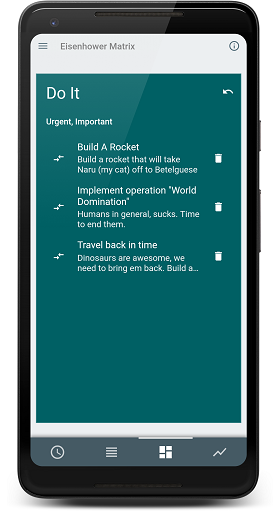
I created four cards that represents each Eisenhower quadrants for the third tab. A preview of the tasks that was placed under each of the quadrant's title. These are determined by the priority you chose when creating a task back in the task tab. High priority task will automatically be categorized as Urgent and Important task.
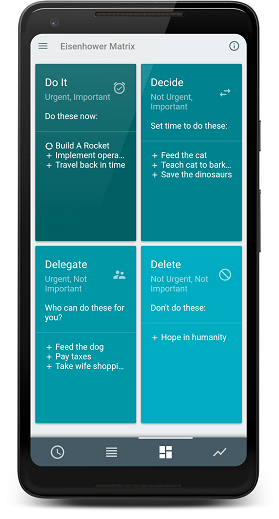
Expanding a quadrant will list all the current tasks categorized on the said quadrant. If you ever like priority has changed you could move it to a different quadrant. The same thing could be achieved when editing the priority of a task but not in an Eisenhower quadrants perspective.
Lastly the final tab is the reports. As a Software Engineer, part of the job entails some paperwork (I bet you didn't expect that), but not the traditional paperwork most desk jobs has. Our version of paperwork has something to do with metrics, task tracking, burndown charts, and other stuff — pretty boring stuff if you're not the manager or the scrum master and you really just don't care about how fast you're going, you just want to write code and go home. Let's admit it though, logging hours on your tasks is pretty boring. It takes away from your momentum when you're deep in that coding frenzy, implementing features one after another, fixing bugs as fast as you gulp that coffee. Much of the inspiration for this simple app is solely for this. At the end of the day or week, I wanted to see what tasks I've worked on for the day and how long I spent working on them.
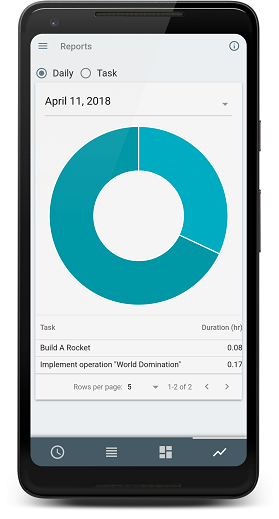
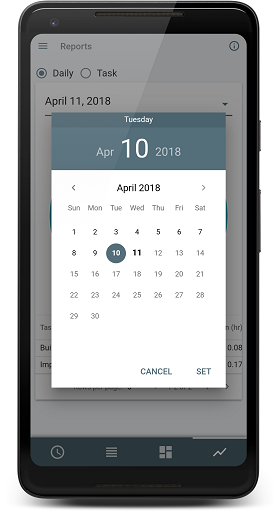
All that's left to do now is to update those Jira cards at the end of day and my scrum master would be very happy. If ever I forgot to log my work hours on a day, I could still filter the date and chose from the really simply awesome datepicker that quasar provided.
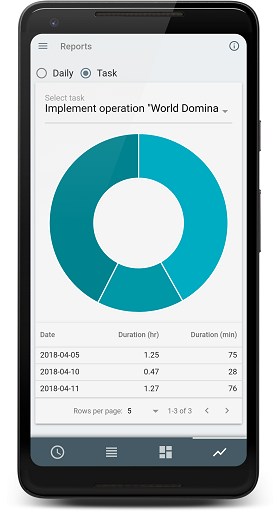
Sometimes, there are tasks that took longer than a day to finish. Maybe it was big or there were other tasks that needed your attention that you had to park the current task you're working on — I added a task view for that scenario. It's funny how trivial this report charts feature is but it ended up as what I like the most.
I also implemented other features like keep awake and local push notifications so that the app can still run on the background and just display a notification when the timer's up. I also made it to be always on full screen mode, I just felt like it feels more "focused-inducing" when the app is in full screen.
To really cap this project off, I signed up for a google developer account in order to publish the app on google playstore. You had to pay a $25 one-off registration fee but you can publish as much apps as you like afterwards. It's not a bad of a deal. Publishing the app in google play is pretty straightforward, you fill out all the necessary information upload your APK and then you're done. (Click this link for more information about rolling out a release) You had to wait for a couple of hours before the app becomes visible on the playstore.
Before uploading the APK, I had to make sure it's signed and zip aligned first. Android requires that all APKs be digitally signed with a certificate before they can be installed. After building my Quasar app using quasar build -m cordova the resulting .apk will be available on the appropriate release folder (project-dir/src-cordova/platforms/android/app/build/outputs/apk/release). I generated my private key using keytool and then used jarsigner to sign the package. apksigner could also be used to achieve the same results. After successfully signing my APK, it's also required to zip align the package or google play console will throw an error. I used zipalign to accomplish this. (If you plan on using apksigner, it invalidates the package if you make further changes to the APK, therefore, you must use zipalign before signing the package). More information about app signing here.
In just a few hours, Chronocross became visible in the playstore. I informed some of my friends who are also interested with Pomodoro and productivity stuff and gave them the link.
Overall, I'm quite happy with my experience publishing the app and using Quasar. I don't really expect it to perform well in the playstore, I'm really just satisfied that I can cross Chronocross out of my unfinished projects list. There are probably tons of improvements that could still be done. I could even generate an electron app out of it, add a report extraction and automate it directly straight to Jira or something. I might update it from time to time if I felt like it. Unless some people would also find it useful and wanted some new features as well. Anyway, I'm quite happy with the experience and I'll probably continue building something else that would beneficial for my workflow using Quasar in the future.